TRADERS TALK.
SO WE BUILT THE
SAFE VERSION.
SentryQ users wanted to compare notes — so Community lets you connect with someone, message them, form small groups, and share the chart you're staring at or the trade you're about to place. What it deliberately does not do is let anyone's trade land in your account, or turn other people into a leaderboard. Every rule below is enforced in the data layer, not in a screen you might get around.
ITS OWN
WINDOW.
Community opens as a separate window, so a conversation can sit beside the console rather than replacing the thing you were watching. Messages arrive live — the window holds a connection open and receives rather than polling on a timer.
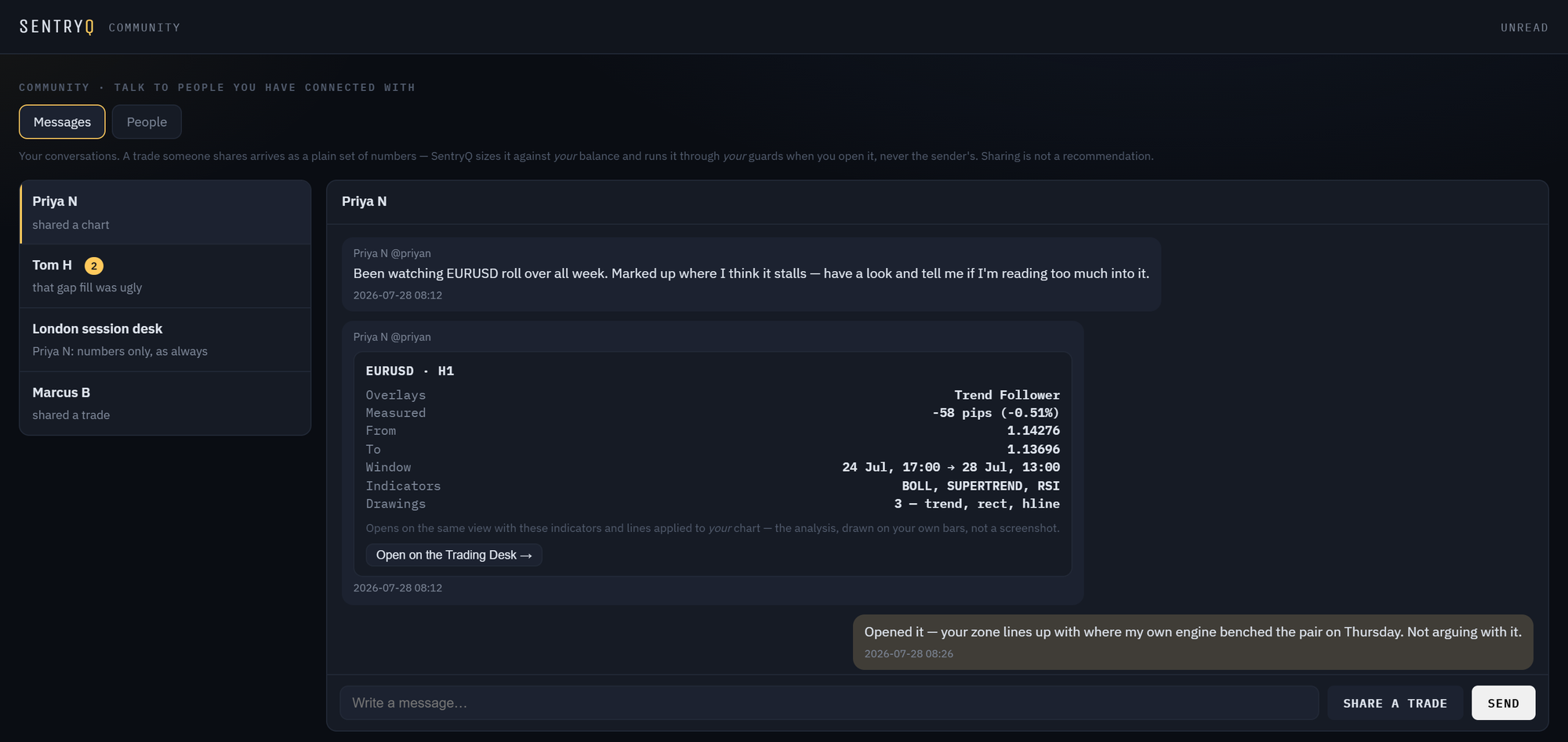
Direct messages
One-to-one with anyone you've connected with. Plain text up to 4,000 characters, plus the two structured cards below.
Small groups
Name a group, add connections to it, leave whenever you want. Group members see each other's messages; the connection rule still governs who you can add.
Unread that means something
Per-conversation counts and a badge on the console tab. Your own messages never count as unread, and reading a conversation clears only that one.
Chart conversations
A conversation opened from the Trading Desk about one pair appears here too, marked chart — so nothing arrives silently while the desk is closed. Those conversations can also carry live shared markup.
Live, not lagging
Delivery is push-style rather than a refresh loop. If your connection drops, the window backs off and retries instead of hammering, and it never wipes an open conversation because one fetch failed.
BY HANDLE.
BY INVITATION.
You pick a handle — 3 to 20 characters — and that is the only way anyone finds you. There is no directory to browse, no suggested-people list, no contact-book upload, and no way to search by name or email.
Someone enters your handle and sends an invitation. Nothing can be sent to you until you accept it. If you'd rather not approve each one, there's a switch to accept automatically — off by default, because the default should be the careful one.
Disconnecting is complete. Remove a connection and neither of you can message the other again — including inside groups you both happen to be in. The check runs on every single message, so a stale window cannot keep posting into a conversation that no longer exists.

| Rule | Where it is enforced |
|---|---|
| You can only message an accepted connection | In the data layer, on every message — not in the UI |
| You can only post to a group you are a member of | Same check, same place |
| A block closes the conversation in both directions | Same check — and the block is applied per reader, so a blocked person's messages vanish from your view of a shared group |
| Invitations must be accepted before anything can be sent | The invite state is the permission; there is no separate flag to get wrong |
NOT A SCREENSHOT.
YOUR ANALYSIS, ON
THEIR BARS.
Press Share on the Trading Desk and the chart you send carries everything that made it yours: the pair, the timeframe, the exact window you were looking at, each indicator with its periods, every line you drew, and any measurement. The recipient's desk then rebuilds that analysis from their broker's data.

Why this is better than a picture
An image of someone's screen is an assertion you can't inspect. The same analysis rebuilt on your own bars is something you can test — nudge the line, change the lookback, see whether the idea survives contact with your data. It also means you are never quietly looking at a different broker's prices while thinking they are yours.
What it is honest about
Your bars are not identical to the sender's. A measurement pinned to prices outside your visible range is clamped into it rather than drawn off-screen, and a window that doesn't exist in your history opens on what does. The card tells you what it is doing instead of silently approximating.
The first version of chart sharing silently discarded anything over a few thousand characters — which meant a genuinely detailed piece of analysis, the exact case the feature existed for, arrived as a blank chart. It was reported by users, and the cause was a length cap that threw the payload away instead of trimming it. Shares are now budgeted properly: the view is fitted to the limit and, if anything has to be dropped, the recipient is told rather than shown an empty chart. How we handle things we got wrong →
THE SAME CHART,
AT THE SAME TIME.
Sharing a chart sends what you were looking at, once. A chart conversation with Live markup on is the version that keeps going: you draw, they see it appear, they draw back.

Lines, zones and indicators
Trend lines, levels, rectangles, Fibonacci, freehand and notes travel as you make them. Indicators travel as a set and are recomputed on each person's own bars.
Drawing is a permission
Everyone in the conversation can read and talk. Marking up the shared chart is granted by whoever opened it, so a room can be a discussion with one person drawing.
A block hides markup too
Blocking someone removes their lines from your chart exactly as it removes their messages from your conversation — filtered per reader, in the data layer.
Still nothing executes
A shared chart is analysis. Nothing drawn on it can place, size or close a trade on anyone's account — that boundary does not move because more people are looking.
Screen sharing would show them your pixels: they could look, and nothing else. Because every drawing is anchored to a bar time and a price rather than a screen position, your analysis can be rebuilt on their chart from their own broker's data — which means they can move your line, change your periods and find out whether the idea survives contact with prices they can actually trade. The honest cost: two brokers a pip apart will show a line a pip apart.
NUMBERS ONLY.
SIZED AGAINST
YOUR ACCOUNT.
You can send an open position, or the ticket you are filling in before you place it. What arrives is a pair, a side, an entry, a stop and up to three targets. Nothing else — no lot size, no account value, no P&L.
Your balance, not theirs
Open a shared trade and it is sized from your balance at your risk percentage. The sender's position size is not transmitted, because it is meaningless on a different account.
Your guards, not theirs
It goes through the same review-then-execute path as a signal you typed yourself, which means all twenty-six protections run. Your exposure caps can refuse a trade the sender happily took.
Nothing happens on its own
A shared trade is a card with a Review this trade button. It has to be read, checked and confirmed by you. There is no auto-accept, and there never will be.
No implied endorsement
The card says plainly that SentryQ has a measured record for signal sources and none for people — so the absence of a track record cannot be mistaken for approval.
Automatically executing someone else's trades on your account is, under European rules, portfolio management: it needs a licence, client suitability assessments and an entirely different regulatory footing from a software product. We are software. So a shared trade always stops at a card you have to act on.
There is also a plainer reason. The moment one trader's decisions are wired into another's account, the person taking the risk is no longer the person making the choice — and every honest number we publish about drawdown becomes irrelevant to them. That is not a feature we want to be responsible for.
WHAT WE LEFT
OUT.
Most of the work on this feature was deciding what not to ship. A trading social network is very easy to make dangerous, and the dangerous parts are the ones that drive engagement.
The same reasoning shapes what the desk itself will say. Ask the agent about a chart and it reads your visible window, your indicators and your own drawings — then tells you where your reasoning is thin. It is forbidden from telling you whether to trade. Describe, measure, critique; never advise a position. Why that restriction is the feature →
| Not built | Why not |
|---|---|
| Copy-trading / auto-execute | Regulated portfolio management, and it moves the risk away from the decision. Permanently out of scope. |
| A leaderboard of people | We measure signal sources because a channel publishes a stream we can score over time. A person's account is not that, and ranking traders on a few weeks of visible trades would be an invented statistic presented as a fact. |
| Follower counts, likes, streaks | Every one of them rewards posting winners and hiding losers. The last thing a leveraged trader needs is an audience score. |
| Public P&L badges | Percentage returns without account size, risk and drawdown are theatre. If we can't show all four honestly, we show none. |
| A public feed or discovery tab | No handle browsing, no suggested traders. You connect with people you already know of, by handle, on purpose. |
| Paid signal selling between users | It would turn every conversation into a sales pitch and make us the venue for it. |
ONE CLICK,
AND THEY'RE GONE.
Block ends it in both directions immediately — direct messages and anything they post into a group you share. They are not told, and there is no notification for them to react to.
The filter is applied per reader, deep in the query rather than in the interface. That means a blocked person's messages are absent from your view of a shared group while everyone else's conversation carries on normally — the block is yours, not a moderation action against them.
Report sends it to us with the conversation context. And because there is no discovery surface, unwanted contact has to get through an invitation you accepted first — which removes most of the problem before it starts.

IN THE CONSOLE,
AND IN YOUR POCKET.
Community is a tab in the mobile app and a window on the desktop, against the same account and the same conversations. A chart shared to you while you're out shows its card on the phone; open it on the desk later and the analysis is drawn on your own bars.

| Where | What you can do |
|---|---|
| Desktop console | Its own window: conversations, groups, people, invitations, blocks |
| Trading Desk | Share this chart, an open position, or the ticket you're filling in |
| Mobile app | Read and reply, see shared charts and trades, review before executing |
| Anywhere | Connect, accept, disconnect, block, report |
Community is a place to talk, not a source of edge. Nothing anyone sends you has been validated by us, and a confident message is not evidence. The numbers we stand behind are the measured ones on the strategies page — including where they are worse than we'd like.