YOUR ENGINE,
IN YOUR POCKET.
Most trading apps are either a broker's terminal or a notification feed. This is neither. It's a remote control for a trading engine you own — reading its live state, and sending it real commands, from anywhere in the world.
EVERY SCREEN.
NO FILLER.
Every tab earns its place. Nothing here is a marketing surface or an upsell — it's the working instrument panel for your engine.


A FILL REACHES YOUR
PHONE IN SECONDS.
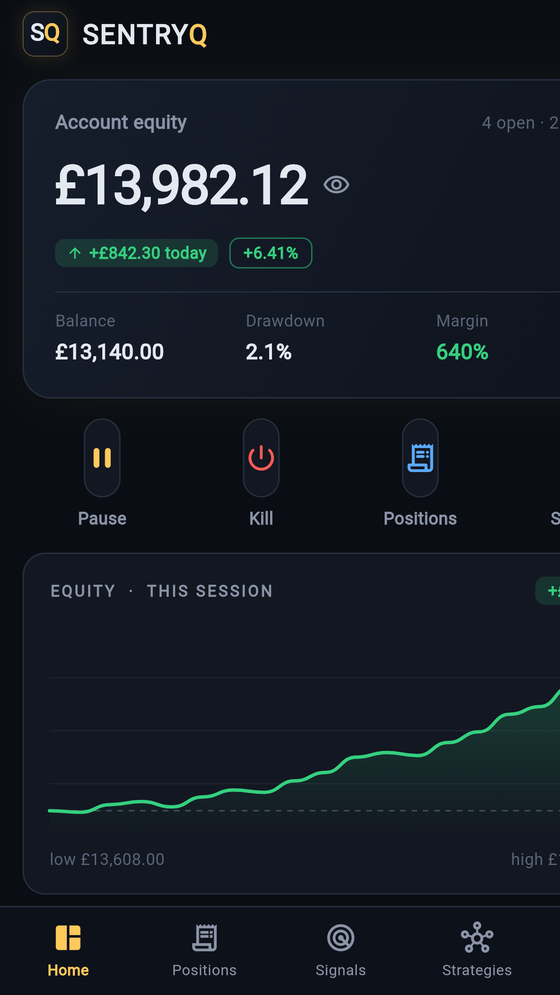
Your engine runs on your machine and the phone reads through your SentryQ account, so freshness is the sum of two steps. Both got shorter in July 2026.
| Step | Was | Now |
|---|---|---|
| Your engine reporting to your account | Every 20 seconds | Immediately when a position or order changes — it watches its own book and reports the moment it moves. A quiet book still reports on the slow beat. |
| The app reading your account | Every 15 seconds | Every 8 seconds while you're looking at it |
| The app while it's in your pocket | Polling anyway | Nothing — it stops entirely in the background and catches up when you come back |
| Worst case, a trade opening or closing | Up to ~35 seconds old | Seconds |
A message arriving in a conversation you didn't have open — or a whole new one someone added you to — used to be invisible until you pulled to refresh. The list now updates on its own while you're looking at it, and stops when you're not.
ONE TAP
TO FLAT.
This is the feature that changes how it feels to run an automated system. You are in a meeting, on a plane, asleep — and something happens. You do not need to get to your desk.
Kill cancels every SentryQ order, closes every SentryQ position and pauses the engine. Pause stops new entries while letting open trades manage themselves to their targets. Both relay through your account and execute on your engine within seconds.
Beyond the big red button: close an individual position, cancel a resting order, toggle any strategy, and adjust risk caps and safety settings — all from the phone, all confirm-first.
And because every order the engine places carries a SentryQ label, the kill-switch touches only its own trades. Anything you placed yourself in your broker's platform is left completely alone.

THE CONVERSATION,
IN YOUR POCKET.
The Chat tab is the same Community as the desktop window, against the same account and the same conversations. Someone shares a chart while you're out; you read it on the phone and open it properly on the desk later.


The card names the pair, the timeframe and what the sender measured — here, −49.6 pips (−0.43%) on their own bars. Tap through and the same span is drawn on your chart, from your broker's data. On the desktop the sender's indicators and lines come with it too. The full design →
SEE A SIGNAL.
SIZE IT PROPERLY.
A signal lands in a channel while you're out. Historically your options were to eyeball a lot size on a broker app, or miss it. Now there's a third: paste it into SentryQ.
The app parses it, validates the geometry, sizes it from the stop distance at your configured risk, runs the full guard chain, and shows you the plan — lots per tranche, cash at risk — before anything is placed. Multi-target signals are split into tranches that share a stop.
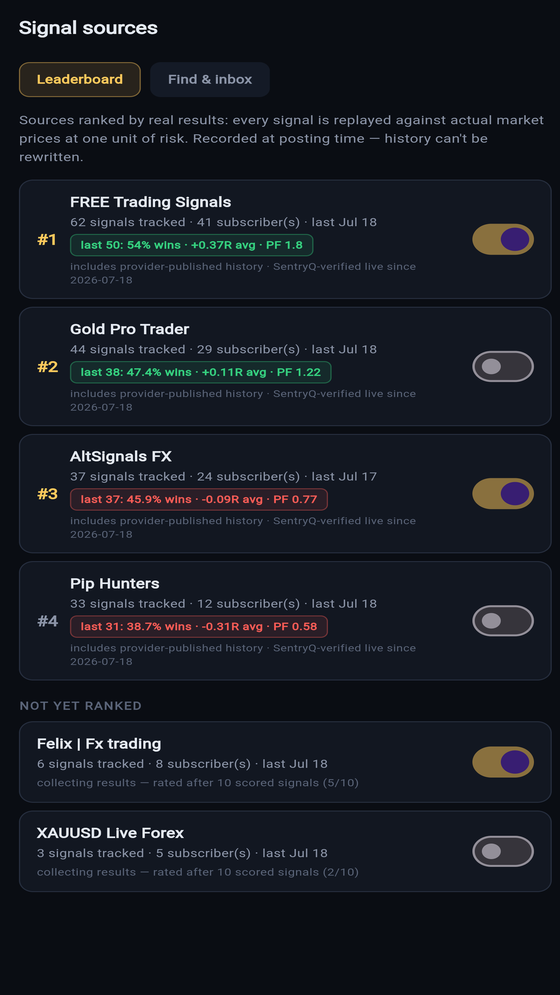
Or work from the Sources tab: follow a channel and its signals arrive already sized and checked. Tap through the leaderboard to see the honest scores first — how scoring works →
THE CONTEXT,
NOT THE ADVICE.
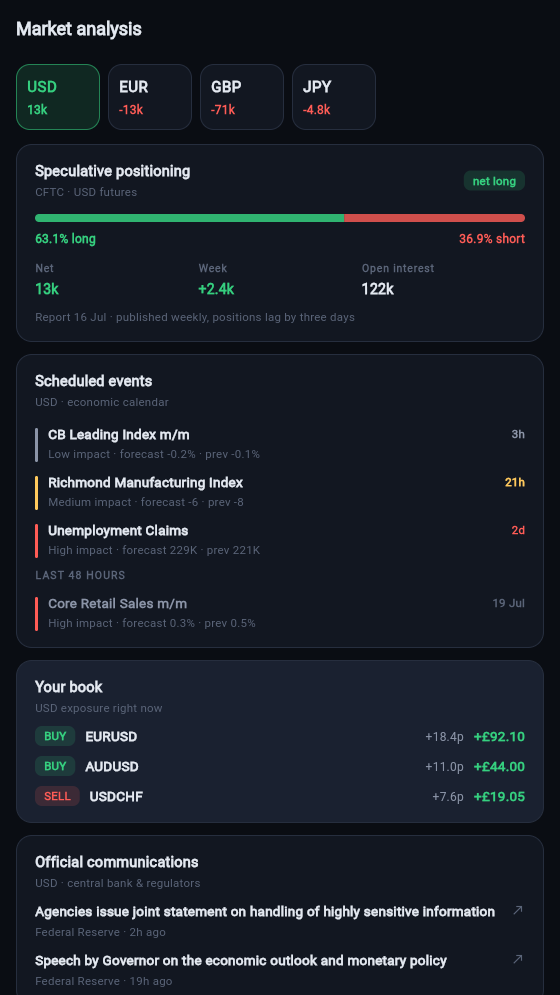
The desktop console has a dedicated Market Analysis window. The phone carries the same read, sized for a screen you check standing up — and it opens on the currencies your engine is actually watching or holding, not a generic world tour.
Tap a currency for four things: what's scheduled from the economic calendar and what just landed, who's positioned where from the CFTC's weekly commitments-of-traders report with the long/short split and the week's change, what the central bank has said — headlines straight from the Fed, ECB, Bank of England, Bank of Japan, RBA, Bank of Canada or SNB — and your book: your own open positions carrying exposure to that currency, right beside the global picture.
That last panel is the part nobody else can build. Anyone can put a news feed in an app. Showing how the news lands on the account you are actually running takes both halves — the market data and your live positions — and SentryQ is holding both.
Two tabs: Macro for the per-currency read, and Wire — every headline from all twelve sources in one feed, filterable by category, with anything touching a currency you hold marked out in gold. The desktop console adds a Board of cross-market measurements and measured alerts; see those here →
What it deliberately is not: a signal, a score, or a view. It is scheduled events, published figures and official statements, with the numbers attributed and dated. Headlines open at the publisher — we link to their work, we don't republish it. What you do with any of it stays entirely yours.
KNOW IMMEDIATELY.
NOT AT THE WEEKEND.
Trade events
A position opened, a target banked, a stop hit, a breakeven move — delivered the moment the engine acts, with the strategy that did it.
Guard events
The Equity Guardian tripping, the daily loss limit halting the session, the News Guard suspending entries, a margin warning. You hear about protection as it happens.
New signals
Signals from sources you follow, already parsed and sized against your account — ready to approve or dismiss.
Sudden moves, explained
A pair runs several times its normal hourly range in ten minutes — the platform checks the calendar and the wire for anything in the same window and tells you what coincided, or says plainly that nothing has yet. If you hold the pair, it reaches you directly.
All of it lands by push notification, email, or Telegram — enable whichever you want, per channel. The daily plain-English summary can arrive the same way.
WHAT THE PHONE
CAN'T DO.
A phone is the device most likely to be lost or stolen. So we designed the app around a simple principle: it should be capable of controlling your engine, and incapable of compromising your broker.
| Concern | How it's handled |
|---|---|
| Broker credentials | Never on the phone. The app has no broker connection at all — it talks only to your SentryQ account, which itself never holds broker passwords. |
| Lost or stolen device | Sign out remotely from your web account. Worst case, an attacker with an unlocked phone could stop your trading — not move money, which cannot be done from any SentryQ surface. |
| Accidental taps | Every destructive action — kill, close, cancel, place — is confirm-first with an explicit dialog. |
| Connection loss | The app shows engine status and the age of the last snapshot. If it can't reach your engine it says so plainly rather than showing stale numbers as if they were live. |
| In transit | All traffic over HTTPS; commands are authenticated per account and executed locally by your engine, which independently validates them. |
GET THE APP.
Included with every plan at no extra cost — Starter through Elite. There is no "mobile add-on"; controlling your own engine shouldn't be an upsell.
| Item | Detail |
|---|---|
| iOS | iPhone and iPad. App Store listing rolling out now — beta access available today from your account page. |
| Android | Phones and tablets. Google Play listing rolling out now — beta access available today from your account page. |
| Requirements | A SentryQ account and a running engine (desktop or hosted). The app is a companion — it doesn't trade on its own. |
| Cost | Included in every plan. No in-app purchases; subscriptions are managed on the website. |